Project News
Workday Student Update
February 3, 2026
We are pleased to announce that a major milestone in the Workday Student project was completed on January 23, and student data has been converted into the Workday tenant that we use on a daily basis. We encourage you to ensure that you can log into Workday with Single Sign On (SSO); if you are having difficulties logging in, please contact the Help Desk.
As a reminder, all actions that relate to the Spring and May terms will take place in eServices, for example, mid-term and final grades. All activities that relate to the Fall 2026 term will take place in Workday, beginning with advising and registration for fall courses.
In the coming weeks, faculty advisors will hear from Kelley Hall about opportunities to learn about navigating Workday as an advisor including how to view advisees, what the student experience will look like related to registration and how to set up advising appointment availability. Additionally, we are developing materials that provide an overview for all faculty…
End-to-End Testing for Workday Student
August 12, 2025
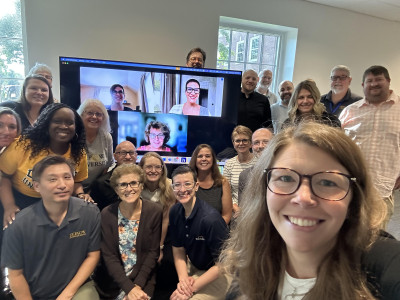
Last week marked an exciting milestone in our journey to modernize our student information systems. DePauw welcomed our colleagues from Workday to campus to conduct End-to-End Testing for the Workday Student project, a critical step as we prepare to bring this new system to life.
Our cross-campus project team collaborated closely with Workday experts to walk through real-life student scenarios from start to finish. These sessions ensure that every process is integrated seamlessly, and ready to serve our students, faculty, and staff. This is more than just testing software; it's about transforming how we deliver information, streamlining processes, and improving student experience for years to come.
A huge thank you to everyone involved.
Workday Student Timeline - Fall 2025 & Spring 2026
July 29, 2025
Workday Student Timeline
Fall 2025 Preparations and Testing
November 4 - 6, 2025 - "Mock Semester" - Key faculty and student volunteers will conduct a full-scale simulation of Workday Student functionality to confirm its readiness for advising, course registration, student billing and financial aid, and other Student-related processes. This will inform final adjustments and guide instruction/training materials to prepare for go-live in Spring 2026.
Spring 2026 Transition Period
Spring 2026 will be a transition period where students and faculty use both e-Services and Workday:
- e-Services will be used to handle activities for Spring 2026 courses and student billing
- Workday will be used to manage Fall 2026 course registration, advising, and billing
Find more details at www.depauw.edu/it/workday/project-timeline.
Managing Split Costs in Workday
April 9, 2025
In Workday, you can split costs across multiple funding sources. This promotes collaboration between departments and keeps Cost Center Managers informed, allowing them to review and approve expenditures from their department’s budget. In the past, this process involved one department purchasing and requesting transfers from the University’s Business Office to allocate funds to the appropriate accounts. Now, with Workday, the process is more streamlined.
Expense Reports
For Expense Reports, users can "Itemize" the expense line to charge it to multiple funding sources. However, itemization should only be used when more than one funding source is involved. Cost Center Managers can quickly review charges by opening the Expense Report. Under itemization, click View Details to see each line and the corresponding charges before approving them.
Amazon Connect Requisitions
When making purchases through Amazon Connect, you can split the order into multiple lines and assign a funding source to…
Enhanced Menu Navigation in Workday
March 26, 2025
We are excited to share the latest update to your Workday dashboard! The most recent release improves the organization of your apps, making it easier than ever to navigate. Now, your apps are automatically grouped into categories designed to enhance discoverability and streamline your navigation experience. Depending on the apps you have, you may see sections like Organization for tools such as the Directory or Personal for your absence, pay, and expense hubs.
When you add a new app (click Add App at the bottom of your menu), you will see which category it is automatically placed in. This ensures that everything stays organized and easy to find.